AEOS — Tax Office Operating System
● Tax Office Operating System

RUN YOUR TAX OFFICE.
NOT YOUR SOFTWARE.

Your team should never have to run the backend of your software.

AEOS gives them one Command Center to see and manage only what matters — clients, returns, documents, assignments, and what needs attention.

Behind the scenes, AEOS runs the backend 24/7: moving data, triggering workflows, updating return stages, and handling client communication automatically.

They run the tax office. AEOS runs the system.

Command Center  •  Client Portal  •  24/7 Backend Operations
AEOS Tax Office Command Center
● Built Around The Return

Everything your team needs.
Without the CRM clutter.

Your team shouldn't have to dig through a CRM just to figure out what needs attention. AEOS gives your office a focused operating layer built around the work that actually matters.

01 / CLIENTS

Client Management

Manage the client and their return without searching through a complicated backend.

02 / RETURNS

Return Tracking

See where every return stands and what needs to happen next.

03 / DOCUMENTS

Document Requests

Know what's missing, select what you need, and let AEOS continue the process.

04 / PREPARERS

Focused Access

Preparers see the clients and returns assigned to them — not the entire backend.

05 / OWNERS

Office Visibility

See what's moving, what's waiting, and what needs attention across the office.

● How AEOS Works

One action for your team.
The system moves behind it.

The Command Center isn't just another dashboard. Actions taken inside AEOS are connected to the workflows and operations running behind your tax office.

01 / Your Team

Mark what's needed.

A preparer opens a return, marks it Missing Documents, selects the missing items — W-2, 1099, Photo ID — and saves.

02 / AEOS

AEOS handles the backend.

The client record is updated, the correct workflow is triggered, and the return stays in the right operational stage.

03 / Client

The client knows what to do.

AEOS automatically notifies the client with exactly what's missing and keeps the client side of the process connected.

Your team takes the action. AEOS handles what happens next.
● Work Smarter

Built for owners.
Simple for preparers.

Owners need visibility. Preparers need focus. AEOS gives each team member the information they actually need without forcing them into the entire backend.

For Owners

See the operation.

Know what's moving, what's waiting, and where your office needs attention without digging through the CRM or asking your team for updates.

Active Returns 48
Missing Documents 8 NEED ACTION
Awaiting Signature 6
For Preparers

See the work.

Preparers log in, see their assigned clients and returns, and know what needs to happen next. They don't need to understand workflows, triggers, or the backend.

Johnson, Mark MISSING DOCUMENTS
Robles, Samantha Awaiting Signature
Garcia, Luis Final Review
● Preparer Command Center

Your preparer sees the work.
AEOS handles the system.

Preparers see their assigned returns, what needs attention, document issues, and where each return sits in the process — without managing the backend.

AEOS / COMMAND CENTER ● LIVE SYSTEM

Good evening, Jordan!

Summit Tax Group · Preparer view

8 Active Returns
3 Missing Documents
2 Awaiting Signature
1 Needs Attention
14 Completed

Needs Your Attention

Operational exceptions from your assigned returns.

Marcus Reed Last activity 2h ago
Missing Documents
Nicole Hayes Last activity 5h ago
Needs Attention

Office Access

Secure access verified for your office.

Office Summit Tax Group
Access Role Preparer
Your access is limited to the client returns assigned to you.

Tax Return Pipeline

4 Intake Submitted
2 Under Review
3 Missing Documents
2 Preparing Return
2 Awaiting Signature
● Connected By AEOS

One system for your office.
One experience for your clients.

AEOS connects both sides of your tax operation — the Command Center where your team works and the secure Client Portal where clients stay connected to their return.

Your Tax Return

Welcome back, Mark. Here's the latest update from your tax office.

Missing Documents Your office still needs:

• W-2
• Photo ID
• 1099-NEC

Return Status

We're waiting on the requested documents before preparation can continue.

AEOS Client Portal

Your clients stay connected without chasing your team for updates.

Clients can securely access their portal, see their return status, view document requests, and know when your office needs something from them.

Command Center → AEOS → Client Portal

Your team knows what to do. Your clients know what's happening. AEOS runs the system between them.

● Owner Command Center

See the entire tax office.
From one operating view.

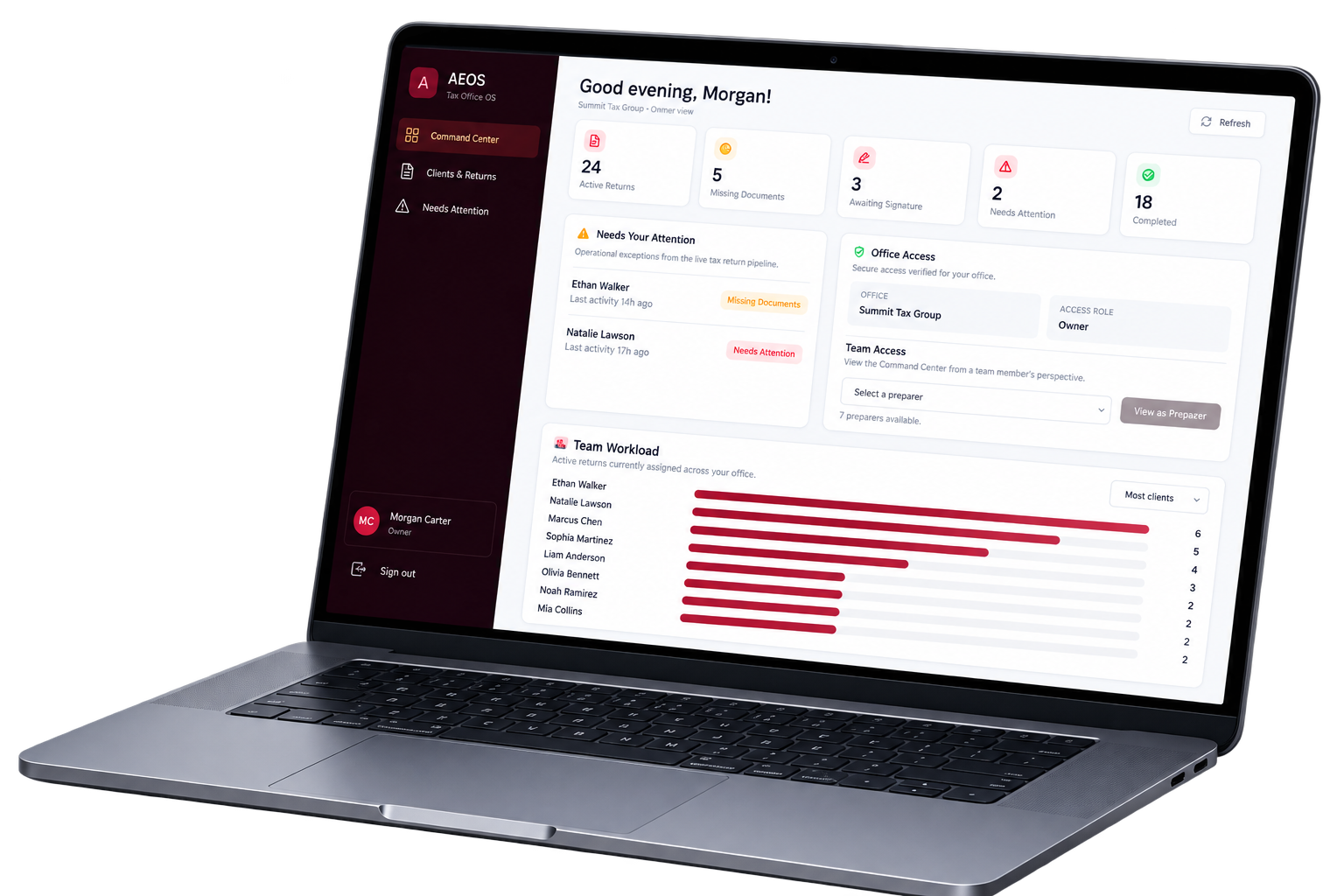
Owners get office-wide visibility across returns, exceptions, preparer access, and team workload without digging through the CRM or asking everyone for updates.

AEOS / OWNER COMMAND CENTER ● DEMO DATA

Good evening, Morgan!

Summit Tax Group · Owner view

24 Active Returns
5 Missing Documents
3 Awaiting Signature
2 Needs Attention
18 Completed

⚠   Needs Your Attention

Operational exceptions from the live tax return pipeline.

Ethan Walker Last activity 2h ago
Missing Documents
Natalie Lawson Last activity 5h ago
Needs Attention

◇   Office Access

Secure access verified for your office.

Office Summit Tax Group
Access Role Owner

Team Access

View the Command Center from a team member's perspective.

Select a preparer
7 preparers available.

▥   Team Workload

Active returns currently assigned across your office.

Sophia Martinez
7
Daniel Brooks
6
Olivia Bennett
4
Liam Anderson
3
Ava Thompson
2
● AEOS V1

V1 is the foundation.

AEOS starts with the core system tax offices need to run the day-to-day operation — Command Center, Client Portal, return tracking, document requests, role-based access, communication, and backend automation.

AEOS will continue evolving based on how tax offices actually run, where teams lose time, and what can be made simpler.

More capabilities. Less complexity. One system that keeps getting better with your tax office.

● Founding Client Program

Be one of the first offices
to run on AEOS.

AEOS is currently accepting a limited group of Founding Clients before standard implementation pricing takes effect.

AEOS Implementation

Your tax office. Configured for AEOS.

Your Founding Implementation covers the setup and configuration of your AEOS environment, Command Center, backend operating system, team access, and onboarding.

Standard $999
$699 one-time
Choose your AEOS commitment
Flexible Commitment

6 Months

$149 / month

A shorter commitment while keeping your office connected to AEOS and the systems running behind it.

AEOS Access Command Center and connected operating environment.
Backend Infrastructure Systems supporting your AEOS environment behind the scenes.
Platform Maintenance Continued maintenance of the AEOS platform and core system.
V1 Improvements Access to continued AEOS V1 improvements as they are released.

AEOS is implemented for your office before your subscription begins. Book a demo to see the Command Center and determine whether AEOS fits your operation.

Book a Demo Call →
Founding Client availability is limited.
● Frequently Asked Questions

Before you bring AEOS into your office.

The questions tax office owners usually ask before seeing the system in action.

Still wondering if AEOS fits your office? See the Command Center and how AEOS connects to the operation behind your tax office. Book a Demo Call →
What exactly is AEOS?

AEOS is a Tax Office Operating System built to help tax offices manage the operational side of the tax return process from one Command Center.

Your team focuses on clients, returns, documents, assignments, and what needs attention while AEOS connects those actions to the systems and automations running behind the office.

Is AEOS a CRM?

Not exactly. AEOS uses CRM and automation technology as part of its backend infrastructure, but your team is not expected to operate from a traditional CRM.

They work primarily from the AEOS Command Center, where the information and actions needed for the tax return operation are brought into a simpler experience.

What powers AEOS behind the scenes?

AEOS uses established CRM, automation, database, and integration technology behind the scenes to support the system.

The AEOS experience is built around the tax office operation — including the Command Center, role-based access, return movement, client communication, and the logic connecting actions inside AEOS to the backend.

Your team does not need to learn or manage the backend technology. That is the point.

Why wouldn't I just use a CRM?

You can use a CRM, but a CRM and an operating system built around your tax office are not the same thing.

With a traditional CRM, your office is still responsible for configuring and managing pipelines, workflows, automations, user access, and the overall backend. AEOS is designed so your team can focus on moving returns forward while the system handles the operational process behind them.

Does AEOS replace my tax preparation software?

No. AEOS does not prepare or electronically file tax returns. You continue using your existing professional tax preparation software.

AEOS manages the operational process around the return — including client management, return tracking, document requests, assignments, communication, and what needs attention.

Do I need another CRM subscription?

No separate CRM subscription is required for the standard AEOS setup. The backend infrastructure needed to support your AEOS environment is included as part of how the system is delivered.

What will my preparers see?

Preparers have a focused view of the work relevant to them. They can see their assigned clients and returns, return stages, document issues, and items that need attention without having to navigate the entire backend system.

Owners have broader visibility across the office, including return activity and team workload.

Can my clients use AEOS too?

Yes. AEOS includes a Client Portal designed to keep clients connected to their return. Clients can access their portal to see return status information, view document requests, and understand when the office needs something from them.

Can AEOS work with the way my tax office already operates?

AEOS is configured during onboarding to support your office's operating environment and team. At the same time, AEOS is intentionally built around a structured tax-return process so your office can create consistency without adding unnecessary complexity.

What does the monthly AEOS fee cover?

Your monthly AEOS subscription supports continued access to AEOS, the infrastructure and systems running behind your environment, platform maintenance, and continued AEOS V1 improvements as they are released.

Your one-time implementation covers getting the system configured for your office. Your subscription keeps the operating environment running after implementation.

What happens during onboarding?

Your AEOS environment is set up for your office, including the Command Center, backend system, team access, and the operational configuration needed to get your office running. You'll also be walked through how your team should use AEOS before implementation is complete.

Will AEOS continue to improve?

Yes. AEOS V1 is the foundation. The platform will continue evolving around how tax offices actually operate, where teams lose time, and where the system can remove unnecessary complexity.

● See AEOS In Action

Your tax office doesn't need more software to manage.

It needs a system it can run from. See the Command Center, Client Portal, and how AEOS handles the operation behind your tax office.

Book a Demo Call →
© 2026 AEOS — Tax Office Operating System Command Center / Client Portal / Automation System Online ●